
-
you are in Personal Banking

General
UOB ExploreGeneralFor Individual
Privilege BankingFor Business
WHOLESALE BANKINGAbout UOB
UOB GroupUOB Vietnam

How can I check the status of my Credit Card payment?
- Once your Credit Card payment has been successfully completed, you will receive a confirmation email from UOB.
- Upon receiving the confirmation email, your payment has been acknowledged by UOB and is pending posting to your Credit Card account. However, your card balance and credit limit are updated instantly.
- You can check your Credit Card payment transaction on the UOB TMRW Vietnam app one working-day after receiving the confirmation email from UOB.
How long does it take for a Credit Card payment to be processed?
- Depending on the payment channel used, the bank requires time to process and record the transaction in its internal system, with a minimum processing time of one business day.
- For more details on available payment methods, please refer to UOB Credit Card and UOB CashPlus Account
Payment issues and errors
- If you make a 24/7 Fast Transfer: Please ensure that you enter the correct Credit Card number. The cardholder's name will be displayed automatically by the system for verification. If an incorrect card number is entered, the transaction will not be processed.
- If you make an Interbank Transfer: Please ensure that all required information is entered correctly, including: "Credit Card number", "Cardholder's name", "Beneficiary bank: UOB". If any information is incorrect, you may need to wait 3–5 business days for investigation, feedback, and potential refund processing by your bank.
What should you do?
- Use a UOB Current Account to make Credit Card payments and have the payment credited immediately. Open a UOB Current Account here.
- Register for Auto Debit from your UOB Current Account to avoid missing payment due dates.
- Prioritize using 24/7 Fast Transfer for faster payment processing.
Check your transaction on UOB TMRW Vietnam
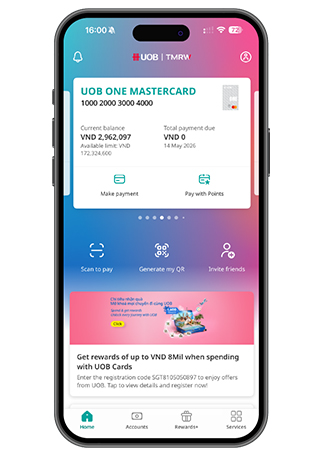
Log in to UOB TMRW Vietnam, go to "Accounts"
Log in to UOB TMRW Vietnam, go to "Accounts"
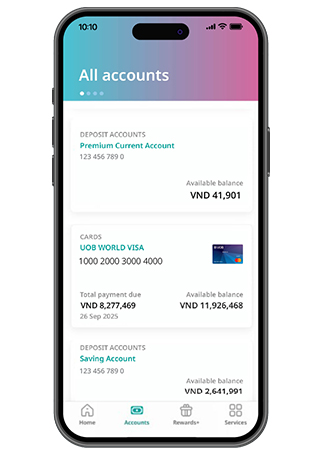
Tap on your preferred Credit Card and tap on “Transactions” to view all your transaction history
Tap on your preferred Credit Card and tap on “Transactions” to view all your transaction history
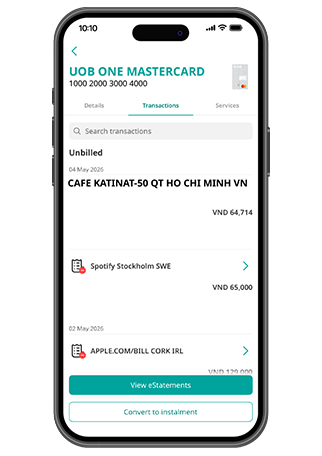
You can see your status of payment
You can see your status of payment
Auto debit not successful?
- If you have registered Direct Debit Authorization (DDA) from your CASA account to your Credit Card or CashPlus account, please ensure you maintain sufficient balance at least 2 days before the scheduled deduction date.
- If your balance is insufficient during this period, the auto debit may fail.

As a reminder, we will never direct you to a website asking for your personal banking details, including OTP or PIN.
We use cookies in order to provide you with better services on our website. By continuing to browse the site, you agree to our privacy notice and cookie policy.